The Things I Hate About IDLE That I Wish Someone Would Fix
Posted by Al Sweigart in python
I’ve written a book on Python programming for kids and complete beginners. I’ve also done some classroom and one-on-one teaching with adults and teens. I have them use IDLE, the IDE that comes with Python, because it is simple and easier than having them set up some other IDE (like PyDev on Eclipse).
But over time I’ve noticed a lot of problems with IDLE that I wish someone would fix. (I’d like to do it myself but I don’t have the time currently.) I’m very, very grateful that Python comes batteries included vis-à-vis an IDE, but there are a lot of warts and user interface issues with IDLE. (These are different from the bugs listed on the python.org bug tracker.)
First off, my philosophy is that no serious Python programmer uses IDLE as their dev environment. With that assumption, we can get rid of any need to cater to them and make IDLE aimed at people who are not only new to Python but new to programming in general. IDLE should be an education tool more than a development tool. This means that the IDLE default options should all be set for the basic user, not the power user.
With that in mind, these are things I’d like to see changed about the design of IDLE (roughly in order of importance and priority.)
UPDATE: 2014/12/26 - It's been a few years since I wrote this article, and I've marked the issues that have been solved. Thanks, IDLE dev team!
1) PROBLEM: In the shell window, if you click anywhere but on the current line and move the cursor there, the window stops handling key strokes.
This caused so many problems when I was teaching a dozen teenagers how to program in Python. Someone would accidentally click on the interactive shell window in the wrong place, and then the window would stop making text appear as they type and they have no idea why. I’d have to pause the entire class to figure out what happened, resume, just to have someone else do it ten minutes later.
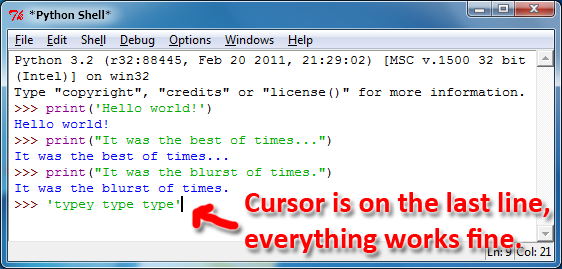
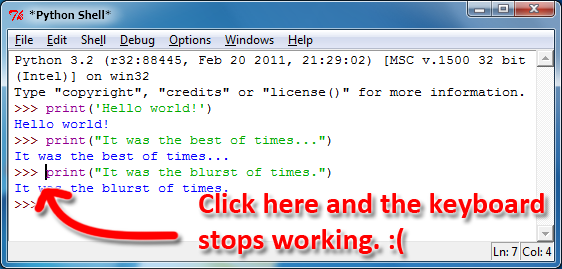
What would we lose by getting rid of this “feature”? Well, we wouldn’t be able to highlight text by holding down shift and banging on the arrow keys. That… hasn’t really been something my students and readers really need. The “select all” covers the case for highlighting everything, and the mouse can be used for highlighting small bits of text. The in-between amounts (where holding down shift and pressing PgUp or PgDn) is a special case that isn’t special enough to break this rule.
Another UI problem that being able to move the cursor back up introduces: When my students' code would raise some exception, they thought they could correct it by scrolling back up, deleting the original code, and then re-typing it out (as if the interactive shell were a word processor). They would move the cursor up, but would be foiled when couldn't change any of the existing text. Getting rid of this misleading cursor stops this issue much earlier in the process and reduces confusion.
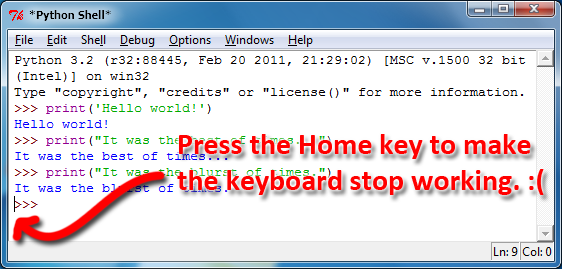
1.1) SUB-PROBLEM: Pressing the Home key moves the cursor before the >>> prompt, which then makes the keyboard unresponsive. (UPDATE: Fixed in 3.3!)
If you are typing at the interactive shell prompt, then want to go to the beginning of the line by hitting the Home key, you’ll then have to hit the right arrow key three times to *really* get to the front of the prompt. Until then, typing characters on the keyboard have no effect.
1.2) NEW FEATURE: Auto-Copy-On-Highlight
Once we get rid of being able to move the cursor off the last line, that opens a new opportunity to implement an automatic copy-on-highlight feature that many terminal and IRC client programs implement. Since this text is read-only, the only reason a person has for highlighting it is to copy it (they can’t delete it.) As soon as the user highlights text in the shell window, it is copied to the clipboard.
2) PROBLEM: When debugging, the current line of code loses its highlighting when the window loses focus. (UPDATE: Fixed in 3.3!)
And the debugger window is a separate window so the file editor is forced to lose focus to operate the debugger.
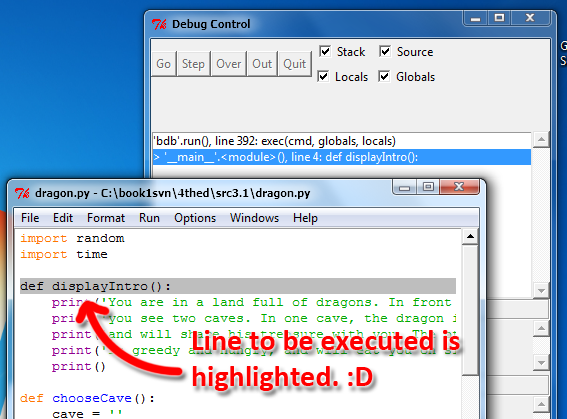
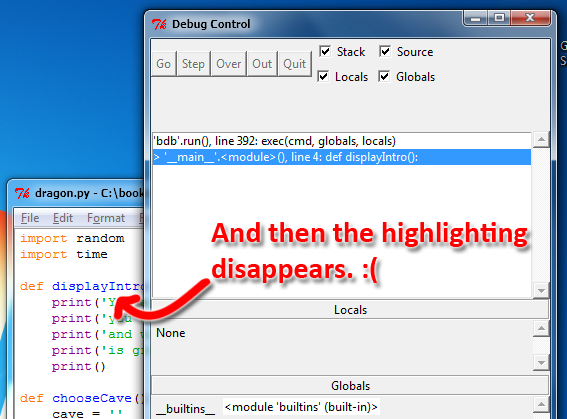
I’m sure this is due to some sort of tk issue, but it’s annoying.
3) PROBLEM: There’s no obvious way to stop a running program. (Don’t expect them to know Ctrl-C)
Beginners won’t know or be able to remember the Ctrl-C trick to interrupt some infinite loop. MIT’s Scratch has a good idea where the program is started by clicking on a green flag and stopped by clicking on the red stop sign next to it. A small red icon with a “Stop the current program” tooltip would be great, or at least having a menu to invoke a keyboard interrupt would be better than expecting them to remember a keyboard combination.
4) ANNOYANCE: Get rid of the detachable menus feature.
Enough said. Clicking on those “---------” options in the menu to make them into their own standalone windows is a weird feature that I don’t see anyone, especially beginner coders, make use of. Just get rid of them. No other software does that because if the user wants a shortcut to the menu, that’s what keyboard shortcuts are for.
5) PROBLEM: Opening a file editor window or a shell window isn’t clear.
On the shell window, you have File > New Window. This isn’t clear that it is opening a file editor window, as opposed to another shell window. It should be renamed to File > New Editor Window.
On the file editor window, you have Run > Python Shell to re-open (or re-focus if it is open) the shell window. Two problems: The Run menu is in the middle of the menu bar. This is an option that belongs under File. And second, “Python Shell” isn’t a clear way to say that it is going to open a new window. It should be moved and renamed to File > Python Shell Window (or maybe File > Shell Window) (UPDATE: I've changed my mind about this, but I think this is still something that could be sidestepped by having a single-window design.)
6) PROBLEM: IDLE crashes when you quit a Pygame game without calling pygame.quit(). (Update: Fixed in 3.3!)
I know this is probably some generic leftover-references problem, but Pygame is a fairly major library that new programmers use (game making being a big way people get into programming.) But I’d agree with the Raymond Chen/Sim City approach and go ahead and make a specific change to check if Pygame was loaded and pygame.quit() was not called by the time sys.exit() was called.
7) ANNOYANCE: It’s too easy to forget the .py extension when saving a file. (Update: Fixed in 3.3!)
My text editor detects when I’m trying to save a file without an extension, and offers to add the .txt extension. This is handy, especially given that IDLE’s file editor turns off syntax highlighting when the file doesn’t end with .py (even though you can still run this “non-python” file just the same).
8) NEW FEATURE: Get rid of the Windows > Zoom Height feature. Get rid of it and replace it with a standard “Tile Horizontally” and “Tile Vertically” option, so that the shell window and the editor window can easily be both maximized and seen at the same time.
9) ANNOYANCE: Get rid of the Edit > “Show surrounding parens” feature. If anything, it should be done automatically all the time whenever the cursor moves around the file editor window.
10) PROBLEM: The Debugger UI needs to be cleaned up.
The user interface for the debugger is ugly. The four checkboxes are silly. The Locals and Globals displays don’t expand well when the debugger window expands. There are no keyboard shortcuts for the stepping buttons. You can’t adjust the size of the Locals display when the Globals display is open. Et cetera.
11) PROBLEM: The Configure IDLE UI needs to be cleaned up. (Update: Fixed in 3.3! Though I still see some changes that could be made.)
A slider bar for setting the standard indentation width? A select list for the font size instead of a combo box? The Ok and Apply buttons are always enabled even if no changes have been made? No “Reset to Defaults” button? The “Custom Highlighting” fieldset on the Highlighting tab needs to be redesigned. The “Autosave Preferences” should be settable from the dialog box that prompts you to save when you run a program.
And am I the only person who noticed that the Help button doesn’t actually do anything?
12) NEW FEATURE: Add an option to show line numbers along the left side of the editor window, and have it enabled by default. (Update: I'm on the fence about having this feature on by default. It's not so helpful when writing code, but is helpful for a teacher explaining a pre-made program the students are reading. The instructor can point them to line numbers in the code and they are immediately obvious where they are.)
The entire status bar is wasted screen real estate because it is only used for that tiny display of the current line and column. Also, why even bother having that status bar with line/column information for the shell window?
13) ANNOYANCE: The Indent Region and Dedent Region lines use the keyboard shortcut Ctrl-] and Ctrl-[, even though nobody uses that because you can indent the region by pressing tab. However, there is no dedent by using Shift-Tab. Add that.
14) IMPROVEMENT: Get rid of the Format > “Strip trailing whitespace” option from the menu, and just have an option where the editor can do this automatically when you save the file.
15) MODERNIZATION: The Save dialog asks “Do you want to save this untitled document before closing?” and then presents you with Yes, No, and Cancel buttons. Update this to use verbs instead of yes/no: Use Save, Don't Save, and Cancel.
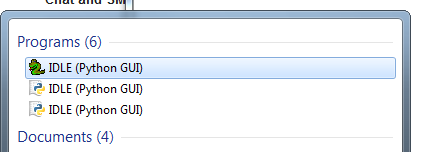
16) ANNOYANCE: The Windows shortcuts for IDLE don't have the version in their name. This wasn't a problem for Windows XP and before, where you just go to the Python shortcut folder (which does have the version info in the name) and select IDLE. But in Windows 7, to launch a program you click Start and simply type "IDLE" to bring up all the IDLE-named shortcuts. Before I changed the shortcut names manually, it was impossible for me to tell which Python version's IDLE I would be starting:
17) NEW FEATURE: Ctrl-Scroll to change font size. (UPDATE from 6/4/2013) Much like how holding down Ctrl and scrolling the mouse wheel will zoom in and out, it'd be nice to have IDLE change its font size by doing this.
One last thing, I think it was a stroke of genius to include a small IDE bundled with the interpreter, especially one that was written in Python itself using the included GUI toolkit. It shows that the Python devs care not just about attracting seasoned developers but also about drawing new people into programming which (as PHP showed us) will turn into remarkable market share later on.
I also understand why IDLE isn't at the top of the priority list: people code away with it for a while, and then move on to a bigger and better IDE. It's a disposable IDE (though I mean that in the nicest possible way). But a few tweaks would improve its usability in that mode of improvement where people may not notice the quality, they just stop noticing any hangups. "It just works."
UPDATE (2014/2/17) - Also, it'd be nice if you could specify command line arguments when you run scripts in IDLE. (Hmmm... maybe this is going too far with the feature set though.)
UPDATE (2014/7/15) - Also, it'd be a good idea to include an integrated pip installer. Something like Sublime Text has for installing plugins.
UPDATE (2014/9/6) - It'd be great if IDLE could detect if the user is trying to run Python 2 code on Python 3 or vice versa. That's about half of the questions I get emailed to me.
UPDATE (2014/9/7) - Thinking about item 1 more, to better convey that you can't type new instructions while the cursor is off the last line, I'd move the final >>> prompt to a small separate window on its own at the bottom of the interactive shell window. This way, the top area is read-only (though the cursor can be moved there to highlight text) while it is understood that instructions are only entered at the bottom when the cursor is there. Also, I've seen cases with the kids I teach where they think of the interactive shell window as a word processor, and when they make errors they try to move the cursor back up to "correct" their code, rather than just retype it in.
UPDATE (2015/4/6) - I've outlined a plan for redesigning IDLE as an educational tool in this github wiki: IDLE Reimagined.
Learn to program with my books for beginners, free under a Creative Commons license:
Take my Automate the Boring Stuff with Python online Udemy course. Use this link to apply a 60% discount.