Lottie Website Tester
A free, single-file website tester that finds broken links, slow pages, and bloated pages on your site — no signup, no paywall, no subscription nagging, no install.
Download lottie.html, upload it anywhere on your domain, and open it in your browser. That's the whole install.
Generated and human-reviewed by Al Sweigart.
Source code available in the git repo.
Why this exists
Every time I wanted to check my own websites for broken links and page-weight problems, I ran into the same wall: the tools that did this well either wanted me to create an account, locked the useful features behind a paid tier, or required a complicated install with Node, Docker, Python virtualenvs, browser extensions, or a desktop client.
I just wanted to point a thing at my site and have it tell me what's broken. So I made one. It's a single .html file. There's no backend, no telemetry, no account, no payment screen, no install wizard — just open the file in a browser and use it.
It will never have a "Pro" tier. There is nothing to sign up for. You own the file.
How to use it
- Download
lottie.html. - Upload the file anywhere on the website you want to test — any folder will do. For example:
https://yoursite.com/lottie.htmlhttps://yoursite.com/tools/lottie.htmlhttps://yoursite.com/private/admin/lottie.html- Open that URL in your browser.
- Click "Start crawl". Watch the results stream in.
That's it. Everything runs locally in your browser; no data is sent anywhere.
Why does it need to be uploaded?
Browsers refuse to let a web page fetch content from a different website than the one it was loaded from — this is called the same-origin policy and it's how the web stays secure. By hosting lottie.html on the site you want to test, your browser sees the crawler and the site as the same place, and lets the crawler do its job.
Want to test it on your local machine first?
The tool detects when it's opened directly from disk (file://) and shows you instructions, but the short version is: run any one of these in the folder containing the file, then visit http://localhost:8000/lottie.html.
python3 -m http.server 8000     # Python 3
php -S localhost:8000           # PHP
npx serve                       # Node.js
ruby -run -e httpd . -p 8000    # Ruby
caddy file-server --listen :8000
What it does
For every page on your site (and the files those pages load), Lottie Website Tester records:
- HTTP status code — finds 404s, 500s, timeouts, and other broken URLs
- Page weight — total bytes downloaded, broken down per page
- Load time — average load time, slowest pages
- Mixed content — insecure
http://resources on securehttps://pages - Broken subresources — missing images, stylesheets, scripts
- Redirects — long redirect chains that slow your site down
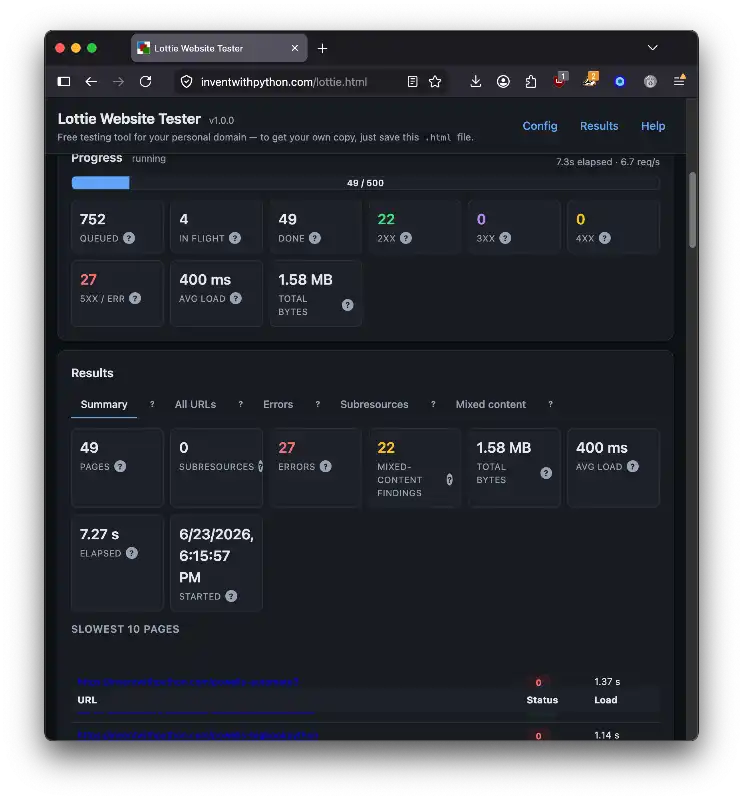
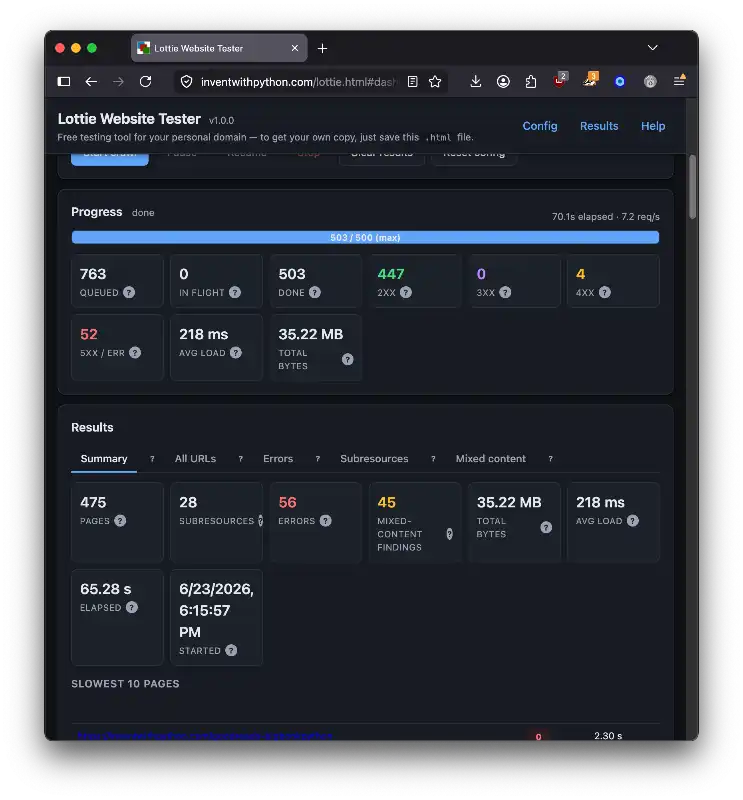
The dashboard shows:
- Live progress — running counts of pages, errors, and bytes
- Summary — slowest 10 pages, heaviest 10 pages, errors grouped by status
- All URLs — sortable, filterable, searchable table of every result
- Errors — broken URLs grouped by the page that linked to them, so you know where to go fix them
- Subresources — per-page breakdown of images, styles, scripts
- Mixed content — insecure resources flagged for fixing
You can export results as CSV (for spreadsheets), JSON (for tooling), a standalone HTML report (a separate self-contained file you can share or email), or copy a plain-text summary to your clipboard.
Features
- Single HTML file. No dependencies, no install, no backend.
- Free forever. No accounts, no paid tiers, no telemetry.
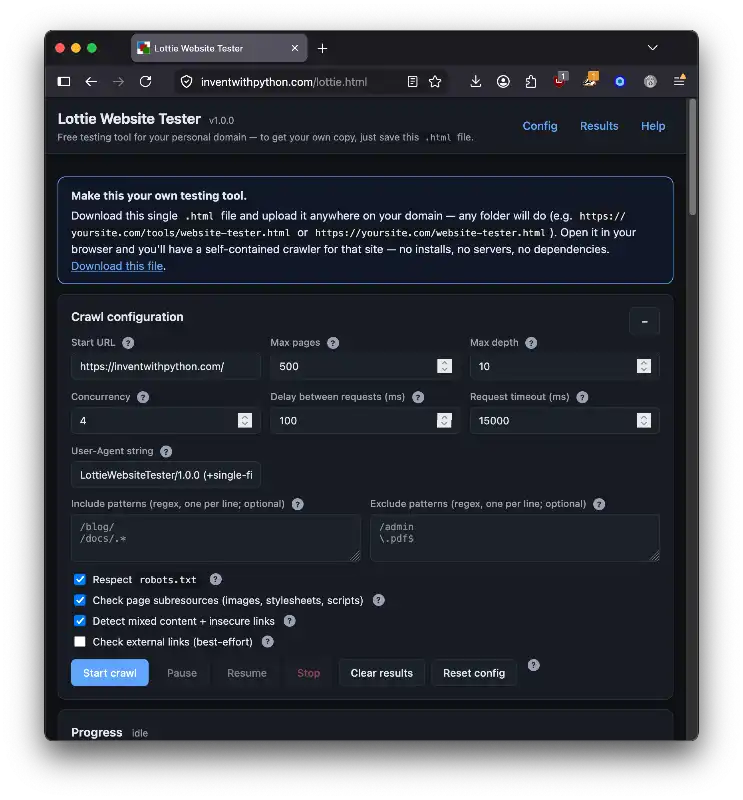
- Configurable. Max pages, max depth, concurrency, request delay, timeout, include/exclude regex patterns, user-agent.
- Polite by default. Respects
robots.txt, uses moderate concurrency and a small delay between requests. - Help icons everywhere. Every stat, setting, and tab has a
?button with a plain-English explanation. Built to be useful for non-developers. - Pause / resume / stop. Long crawls don't have to be all-or-nothing.
- Dark mode. Follows your OS theme automatically.
Limitations
A few things to know:
- JavaScript-rendered pages (SPAs) are not executed. The crawler reads the HTML the server returns; links injected after page load by JavaScript will not be followed.
- Browser CORS rules apply. Same-origin requests give full results (status code, headers, body). Cross-subdomain or external requests fall back to a best-effort "opaque" check (reachable / not reachable).
- Authenticated browsing. The crawler uses your browser's existing cookies for the site. To crawl as a logged-out user, open a private/incognito window.
- Large responses are downloaded in full so byte sizes are accurate. Use exclude patterns to skip very large binaries if needed.